The short version: One USB-C docking station with 4K HDMI out, fast dual-slot card reading, Gigabit Ethernet, and 100W pass-through power lets a mobile creator run external monitoring, rapid card offloads, and continuous charging from a single connection. That is exactly what the PURPLELEC HBC072 docking station is built to do—so your laptop or tablet never has to choose between staying powered and staying productive on location.
The golden window before sunset closes fast, and every second you spend watching a transfer bar inch across the screen is a second of light you don't get back. Today's field creators lean on tablets and ultrabooks to review footage between setups because they're light, fast, and powerful enough to handle high-bitrate 4K. The catch is the body itself: those razor-thin chassis trade ports for portability, leaving you stuck managing an external display, a packed memory card, and a draining battery through one or two openings. Getting all three to work at once isn't about luck—it's about a deliberate connectivity plan that turns a lone port into a full production hub.
The Single-Port Problem on Slim Machines
Devices in the class of the iPad Pro and MacBook Air reshaped the industry by packing serious editing horsepower into a featherweight shell. They'll cut high-bitrate 4K without breaking a sweat—but many of them ship with just one or two ports, and that's where the trouble starts on set. Plug in a card reader to ingest footage and you've just claimed the same port you needed for power. Want to throw the shot up on a bigger screen to confirm focus? On a bare machine you simply can't drive an external display and do anything else at the same time. Those physical limits are exactly why a well-built multi-port docking station like the PURPLELEC HBC072 stops being a luxury and becomes the bridge that unlocks what your mobile rig is actually capable of.
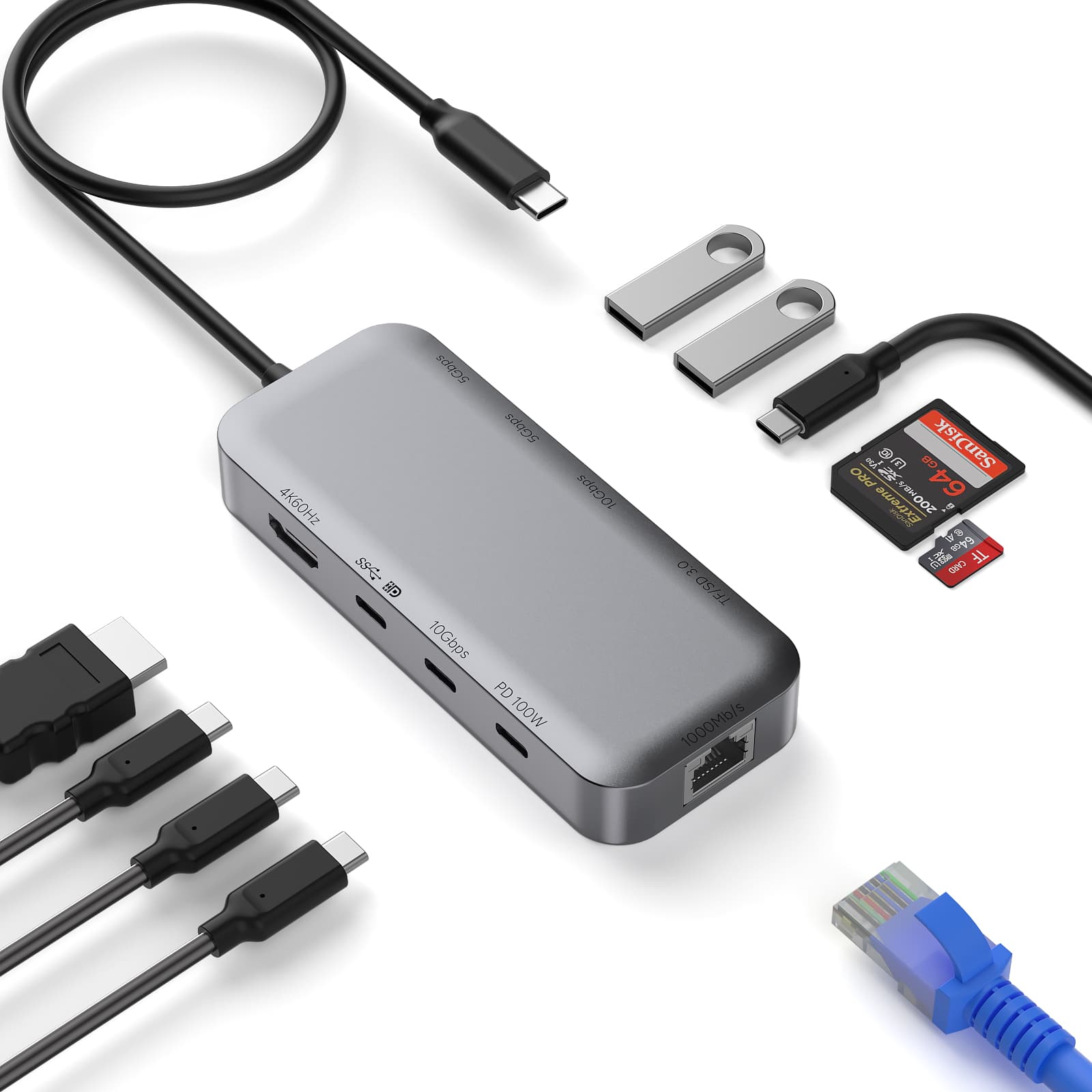
HBC072 connectivity at a glance
• 1 x USB-C upstream (connects to host)
• 1 x USB-C PD 100W (pass-through charging)
• 2 x USB-C 10Gbps (data)
• 2 x USB-A 3.0 5Gbps
• 1 x HDMI 4K@60Hz
• 1 x USB-C (DisplayPort / 10Gbps)
• 1 x RJ45 Gigabit Ethernet (10/100/1000M)
• 1 x microSD/TF 3.0 (up to 104MB/s)
• 1 x SD/MMC 3.0 (up to 104MB/s)
Aluminum + ABS housing
Choosing Hardware Built for True 4K Monitoring
Before anything goes into your field kit, look hard at the output specs, because they decide what your eyes actually see. A USB-C to HDMI path has to hold a high refresh rate to be worth anything to a working editor. Refresh rate is simply how many times per second the panel redraws the image—and if the link tops out too low, your 60fps footage turns choppy and judders on the external screen, which makes judging motion blur nearly impossible. The HBC072 docking station pushes a clean 4K signal at 60Hz, which keeps playback fluid enough to trust.
The terms below get thrown around a lot in output specs, so here's what they mean for your edit:
| Term |
What it means |
Why it matters on set |
| Refresh rate |
How often the image updates, measured in Hertz |
Higher rates keep fast action smooth and readable |
| Latency |
The lag between your device and the monitor |
Low latency keeps audio in sync and reactions sharp |
| Resolution |
The total pixel count the display shows |
More pixels let you confirm critical sharpness |
Nail those three and the external panel becomes a faithful mirror of your source file—no smearing, no artifacts, no guesswork.
A Stable HDMI Link to Your Field Monitor
Once the standards are sorted, the HBC072's 4K@60Hz HDMI output becomes your line to a proper field monitor. A tablet screen is gorgeous but small—too small to share with a client and too small to reliably catch a stray hair or a hair's-breadth focus miss. Route the picture out to a bright external display and the whole crew sees precisely what the camera recorded without huddling over a six-inch panel. A solid docking station holds that signal steady too, so the image doesn't flicker when you reposition the laptop or nudge the monitor arm mid-shoot.
Faster Offloads from Dual SD and microSD Slots
On set, efficiency comes down to how fast you can pull data off a card and onto a backup. Modern cameras spit out enormous files, especially in flat Log profiles meant for grading, and a slow reader turns every offload into dead time. The HBC072 gives you dedicated full-size SD and microSD slots running the SD 3.0 standard, reading compatible UHS-I cards at up to 104 MB/s—a real jump over a sluggish built-in reader. Just as useful, it reads both card formats at once, so a microSD from a gimbal cam and a full-size SD from your main body can come off in the same session.
• Quicker reads mean the reader spends less time working hard and heating up during long copies.
• Steady bandwidth lets you review clips straight off the card before you've even copied them.
• With several downstream ports free, you can back footage up to an external SSD while the cards are still seated.
Less time staring at progress bars is more headroom to think about the next setup.
Wired Reliability over Gigabit Ethernet
Wi-Fi on location is a gamble—crowded venues, dead zones, hotel networks that crawl. The HBC072's Gigabit RJ45 port (10/100/1000 Mbps) gives you a hardwired alternative when uploads actually matter: pushing proxies to a cloud bin, dropping dailies onto a NAS, or syncing a backup before you tear down. A cabled link holds a stable, predictable rate that flaky wireless rarely matches, which is exactly what you want when a delivery deadline is breathing down your neck.
Uninterrupted Power with 100W PD Pass-Through
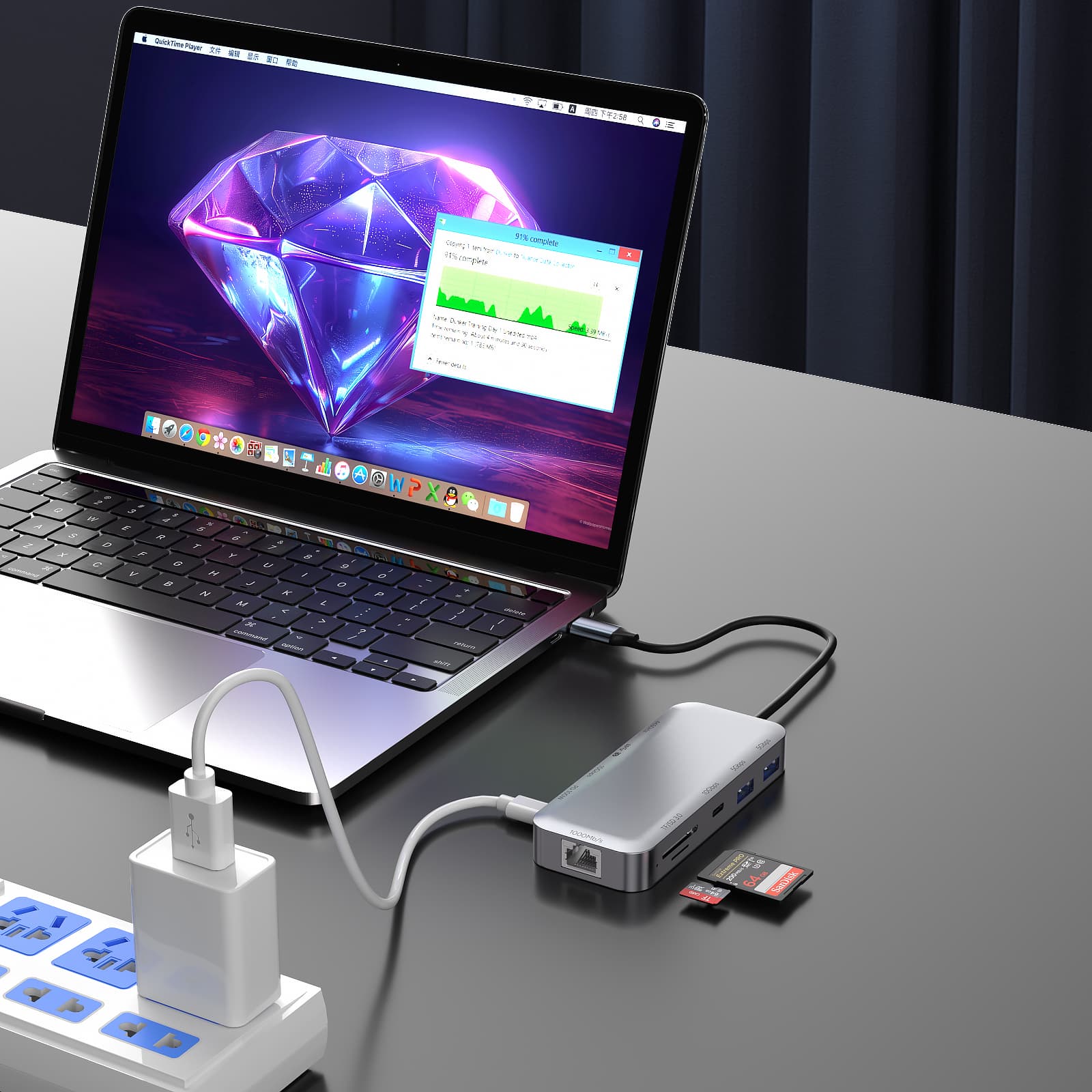
The single most important piece of a field workflow is power—Power Delivery, or PD. PD is the protocol that lets one cable carry serious wattage to demanding machines. The HBC072's 100W PD pass-through means you connect your wall adapter or a beefy battery bank to the docking station itself, and it routes that power straight through to your laptop while it's still driving HDMI and reading your cards. The result is a continuous energy loop that keeps the screen bright and the processor running flat-out, even through heavy renders.
Staying Cool: Why the Shell Matters
Pushing 4K video and indexing card data at the same time generates real heat inside the enclosure. When a device runs too hot it may throttle—an automatic speed cut to protect the chips—or it can drop the HDMI signal entirely. That's why the HBC072's aluminum-and-ABS housing earns its place: the metal works as a heat sink, drawing warmth off the internal components and shedding it into the air. That thermal headroom guards your data against corruption and keeps the monitor from cutting to black in the middle of a client review.
Keeping a Mobile Rig Organized
A chaotic kit loses footage and snaps connectors right when the clock is against you. Tuck your gear into a small padded pouch to shield the delicate pins from dust and knocks. Skip the long, heavy cables that hang off the side of a tablet—that constant tug wears out the port over time. Short, reinforced cables are the better call for handheld or cage-mounted setups.
• Tag your accessories with bright tape so you can find them in a dim corner.
• Use reusable Velcro ties instead of one-time zip ties to keep cabling neat.
• Always pack a spare for the days when nothing is allowed to fail.
Turn One Port Into a Production Hub
Modern field work needs hardware that keeps up with the pace you set. The PURPLELEC HBC072 USB-C docking station solves the single-port bottleneck by handling external monitoring, fast card offloads, wired uploads, and continuous power through one connection. That means no more trade-offs between charging and ingesting, a clearer view for client evaluations on a big display, and quicker transfers while the light is still changing. If you want your mobile machine to behave like a real production workstation on location, the HBC072 docking station is the upgrade that pays off every shoot.
FAQs
Q1: What's the best way to connect a field monitor through a USB-C docking station?
A1: Use a docking station rated for at least 4K at 60Hz, like the HBC072. Plug the docking station into your device's USB-C port, then run a quality HDMI cable from its HDMI output to your monitor's input. You'll see your footage with minimal delay, which is what you need to confirm focus and exposure are right on set.
Q2: Can the HBC072 charge my laptop while it's driving HDMI?
A2: Yes—it has a dedicated 100W Power Delivery port. Connect your power source to the docking station's PD input and the wattage flows through to your machine while the HDMI and data lanes keep running. You won't have to choose between staying powered and staying connected during long shoots.
Q3: Why does my HDMI picture flicker while I'm transferring data?
A3: That usually means the link doesn't have enough headroom to carry video and data at the same time. When you're pulling large files off an SD card, a weaker unit can struggle to hold the HDMI signal steady. A docking station with adequate bandwidth, like the HBC072, keeps the screen stable even while you're moving a lot of files at once.
Q4: Will a USB-C to HDMI output change how my colors look?
A4: No—a properly built output passes the digital signal through without altering the image data. What matters is that it supports a current HDMI standard (HDMI 2.0 or newer) so HDR and wide-gamut information travel correctly. The HBC072's HDMI output is built to pass that information cleanly for accurate color calls during a field review.









